- Home
- About Us
- courses
- Blog
- AI vs Graphic Designers: Why Creative Skills Still Matter in the Digital Era
- Top Reasons to Choose a VFX Course at MAAC Dilshukhnagar
- Top Programs to Launch Your Career in VFX and Filmmaking
- How OTT Platforms Are Creating Demand for Animation & Filmmaking
- Love Playing Games? Discover How You Can Create Them
- Want to Create the Next GTA or PUBG? Start Your Journey with Game Design
- Building Digital Dreams: Exploring Career Opportunities in 3D Animation
- Top Reasons to Choose a VFX Course at MAAC Dilshukhnagar
- Top Programs to Launch Your Career in VFX and Filmmaking
- How OTT Platforms Are Creating Demand for Animation & Filmmaking
- Top 5 Software Tools Every Motion Graphics Designer Should Learn
- Is ADVFX Plus the Right VFX Course for You? Here’s What We Think
- Becoming a Pro Animator: Key Software Skills You’ll Learn at Hyderabad’s Top Institute
- The Game-Changing Future of Content Creation: AI, Automation & Human Creativity
- From Canva to Cinema: How Graphic Design is Evolving in the AI Era
- Career Opportunities After a 3D Animation Course Explained
- Design the Next Big Game: Unlock Your Creativity Journey Today
- Behind Every Blockbuster: The Power of Visual Effects Careers
- Bring Your Imagination to Life with Industry-Ready Animation Skills
- Building Digital Dreams: Exploring Career Opportunities in 3D Animation
- Want to Create the Next GTA or PUBG? Start Your Journey with Game Design
- Love Playing Games? Discover How You Can Create Them
- Top Reasons to Choose a VFX Course at MAAC Dilshukhnagar
- Top Programs to Launch Your Career in VFX and Filmmaking
- How OTT Platforms Are Creating Demand for Animation & Filmmaking
- Top 5 Software Tools Every Motion Graphics Designer Should Learn
- Is ADVFX Plus the Right VFX Course for You? Here’s What We Think
- Becoming a Pro Animator: Key Software Skills You’ll Learn at Hyderabad’s Top Institute
- The Game-Changing Future of Content Creation: AI, Automation & Human Creativity
- From Canva to Cinema: How Graphic Design is Evolving in the AI Era
- Career Opportunities After a 3D Animation Course Explained
- Design the Next Big Game: Unlock Your Creativity Journey Today
- Is Graphic Design a Good Career Choice in 2026? Skills, Jobs & Future Opportunities
- Behind Every Blockbuster: The Power of Visual Effects Careers
- Contact Us
- Faq
- Placements
- Home
- About Us
- courses
- Blog
- AI vs Graphic Designers: Why Creative Skills Still Matter in the Digital Era
- Top Reasons to Choose a VFX Course at MAAC Dilshukhnagar
- Top Programs to Launch Your Career in VFX and Filmmaking
- How OTT Platforms Are Creating Demand for Animation & Filmmaking
- Love Playing Games? Discover How You Can Create Them
- Want to Create the Next GTA or PUBG? Start Your Journey with Game Design
- Building Digital Dreams: Exploring Career Opportunities in 3D Animation
- Top Reasons to Choose a VFX Course at MAAC Dilshukhnagar
- Top Programs to Launch Your Career in VFX and Filmmaking
- How OTT Platforms Are Creating Demand for Animation & Filmmaking
- Top 5 Software Tools Every Motion Graphics Designer Should Learn
- Is ADVFX Plus the Right VFX Course for You? Here’s What We Think
- Becoming a Pro Animator: Key Software Skills You’ll Learn at Hyderabad’s Top Institute
- The Game-Changing Future of Content Creation: AI, Automation & Human Creativity
- From Canva to Cinema: How Graphic Design is Evolving in the AI Era
- Career Opportunities After a 3D Animation Course Explained
- Design the Next Big Game: Unlock Your Creativity Journey Today
- Behind Every Blockbuster: The Power of Visual Effects Careers
- Bring Your Imagination to Life with Industry-Ready Animation Skills
- Building Digital Dreams: Exploring Career Opportunities in 3D Animation
- Want to Create the Next GTA or PUBG? Start Your Journey with Game Design
- Love Playing Games? Discover How You Can Create Them
- Top Reasons to Choose a VFX Course at MAAC Dilshukhnagar
- Top Programs to Launch Your Career in VFX and Filmmaking
- How OTT Platforms Are Creating Demand for Animation & Filmmaking
- Top 5 Software Tools Every Motion Graphics Designer Should Learn
- Is ADVFX Plus the Right VFX Course for You? Here’s What We Think
- Becoming a Pro Animator: Key Software Skills You’ll Learn at Hyderabad’s Top Institute
- The Game-Changing Future of Content Creation: AI, Automation & Human Creativity
- From Canva to Cinema: How Graphic Design is Evolving in the AI Era
- Career Opportunities After a 3D Animation Course Explained
- Design the Next Big Game: Unlock Your Creativity Journey Today
- Is Graphic Design a Good Career Choice in 2026? Skills, Jobs & Future Opportunities
- Behind Every Blockbuster: The Power of Visual Effects Careers
- Contact Us
- Faq
- Placements
AI + UI/UX Design: How Designers Can Work Smarter in 2027
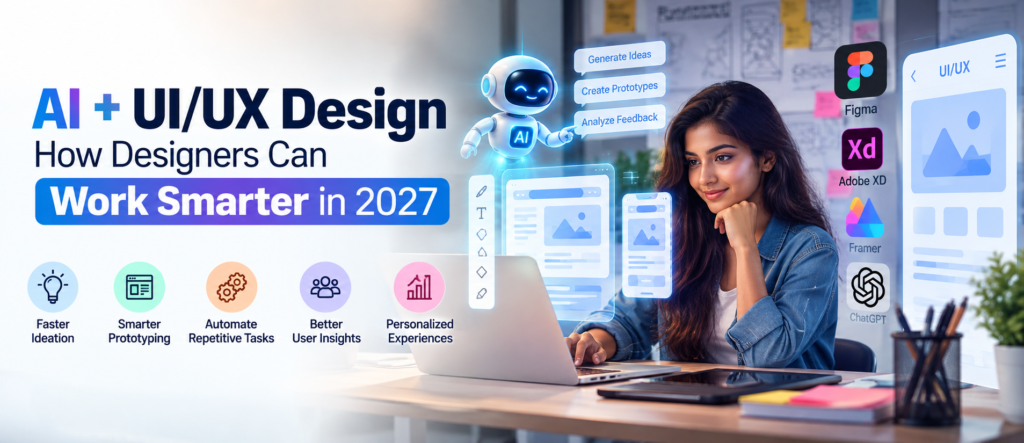
Artificial Intelligence is rapidly changing how digital products are researched, designed, tested, and improved. For UI/UX designers, this change is not simply about automating design work. It is creating new ways to generate ideas, build prototypes, analyze user experiences, and collaborate with developers.
Current design-industry research already points in this direction. Figma’s 2026 State of the Designer research found that 89% of surveyed designers said AI helps them work faster, while 91% said AI tools improve their designs. This suggests that heading into 2027, designers who combine strong UI/UX fundamentals with intelligent use of AI tools may be better equipped for evolving design workflows. Figma
For students planning a creative technology career, understanding both UI/UX Design and AI-powered workflows is therefore becoming increasingly valuable.
How Is AI Changing UI/UX Design?
Traditionally, designers spent considerable time creating wireframes, experimenting with layouts, preparing content variations, building prototypes, and making repetitive design changes. AI-assisted tools can now accelerate many of these activities.
Modern AI design workflows can help designers explore multiple concepts, create prototypes, generate visual elements, automate repetitive tasks, and move between design and implementation more efficiently. Figma describes this evolution as a broader design process in which designers, developers, product managers, and AI agents can increasingly contribute within shared workflows. Figma Help Center
This does not remove the need for design knowledge. Instead, it can shift more of the designer’s attention toward problem-solving, user needs, creative direction and decision-making.
1. Faster Ideation and Concept Exploration
One of the biggest advantages of AI in UI/UX design is speed during the ideation stage.
Instead of manually creating every initial concept, designers can use AI to quickly explore alternative layouts, visual directions, content structures and interface ideas. A designer can then compare these options and develop the strongest concept further.
This is particularly useful during brainstorming because AI can help overcome the “blank canvas” problem. However, generating more options also makes human judgment increasingly important. Designers still need to determine whether an interface is useful, accessible, consistent with the brand and appropriate for the intended users.
Figma similarly notes that as AI makes idea generation easier, an important part of creative work moves toward evaluating, curating and refining those ideas. Figma
2. Smarter Wireframing and Prototyping
Wireframes and prototypes allow designers to visualize how users will interact with a website or application before development begins.
AI can accelerate this process by helping generate initial screens, suggest structures and transform ideas into interactive concepts more quickly.
This means designers can spend less time building every early-stage element manually and more time asking important UX questions:
Does the navigation make sense? Can users easily complete an action? Is the information hierarchy clear? Does the interface solve the intended problem?
For students searching for a UI UX Design Course in Hyderabad or UI UX Design Training in Hyderabad, learning how traditional wireframing principles work alongside emerging AI tools can provide a stronger foundation for future design work.
3. Automating Repetitive Design Tasks
UI/UX projects often involve repetitive work such as reorganizing layers, adjusting spacing, replacing elements and maintaining consistency across multiple screens.
AI-assisted workflows can reduce some of this manual effort. For example, Figma’s 2026 design-agent updates include capabilities for creating reusable tools that can handle tasks such as sorting layers, applying consistent spacing and finding or replacing text or colours. Figma
By automating routine tasks, designers can dedicate more time to research, interaction design, visual refinement and usability.
4. AI Can Support UX Research
Great UX begins with understanding people.
AI tools can assist designers in organizing research material, summarizing large amounts of feedback, identifying recurring themes and preparing information for further analysis.
But AI-generated insights should not automatically be treated as user truth. Designers still need to validate findings, understand context and interact with real users whenever appropriate.
That is why students pursuing UI UX Design Classes in Hyderabad should learn user research, personas, user journeys, information architecture and usability testing—not only AI tools.
5. Personalised User Experiences
Another important direction for UI/UX in 2027 is personalization.
Digital products can increasingly adapt recommendations, content and experiences based on relevant user interactions and context. This creates opportunities for designers to think beyond a single static interface.
At the same time, personalization introduces questions around privacy, transparency, accessibility and user control. Future designers need to understand not only what AI can personalize, but what creates a responsible and useful experience.
6. Human Creativity Becomes More Important
AI can generate many design options quickly, but quantity does not guarantee quality.
Designers still need to understand typography, colour theory, composition, accessibility, visual hierarchy, interaction design and human behaviour. They also need the judgment to decide which AI-generated ideas are worth developing.
This is why learning the fundamentals through a UI UX Design Institute in Hyderabad remains important. AI should complement design skills rather than become a substitute for them.
Figma’s 2026 research found that 90% of respondents considered design at least as important as it was before AI, while nearly six in ten considered it more important. Figma
Skills UI/UX Designers Should Develop for 2027
Aspiring designers should focus on a combination of creative, technical and AI-related capabilities. These include user research, wireframing, prototyping, visual design, responsive design, usability testing, design systems, communication, AI-assisted workflows and prompt-writing skills.
Collaboration is also becoming increasingly important as the boundaries between design and development evolve. Figma’s 2026 research found growing crossover between designers participating in development and developers participating in design. Figma
Students searching for the Best UI UX Design Course in Hyderabad, UI UX Training Institute in Hyderabad, or UI UX Course in Dilsukhnagar should therefore consider training that develops practical design thinking rather than focusing only on software.
Start Learning UI/UX Design at MAAC Dilsukhnagar
For students interested in developing foundational skills for a career in UI/UX and digital design, MAAC Dilsukhnagar can be considered for practical, career-oriented creative training.
Learning core design principles first can help students use emerging AI tools more effectively. A structured learning environment can also help aspiring designers understand workflows, work on practical projects and gradually build a portfolio.
If you are exploring a UI UX Design Course in Dilsukhnagar, UI UX Design Training in Dilsukhnagar, UI UX Institute in Hyderabad, or UI UX Course After 12th in Hyderabad, MAAC Dilsukhnagar is an option to explore based on the course curriculum, tools covered, practical training and current admission details.
Conclusion
AI is not simply making UI/UX design faster—it is changing where designers spend their time. As routine production becomes easier to automate, skills such as understanding users, evaluating ideas, making creative decisions and designing meaningful experiences become even more valuable.
For aspiring designers preparing for 2027, the goal should be to learn UI/UX fundamentals and AI-assisted workflows together. Designers who know how to use AI intelligently while maintaining strong human-centered design judgment will be better prepared to adapt as tools and workflows continue to evolve.